
In This Article
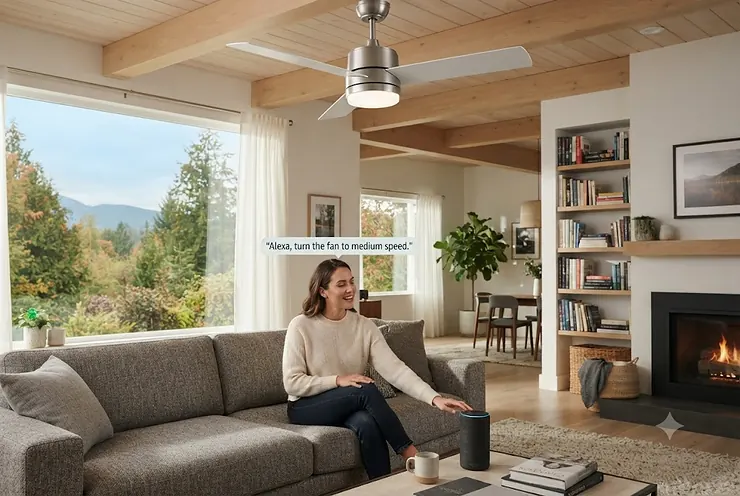
Picture this: it’s a sticky July evening in your living room, your hands are full of grocery bags, and the last thing you want to do is dig around for a remote wedged between the couch cushions. That’s the whole pitch behind an alexa ceiling fan — you just say the word and the blades start spinning. No fumbling, no pull chains snapping off in your hand, no walking across the room in socks on a floor that’s somehow always slightly too cold.

But here’s the thing nobody tells you before you start shopping: “works with Alexa” is printed on a lot of boxes, and not all of it means the same thing. Some fans talk to Alexa natively, straight out of the box. Others need a little translator device sitting on a shelf somewhere. Some fans genuinely respond the instant you speak; others make you repeat yourself twice before the motor even twitches. Knowing the difference before you buy will save you a return shipment and a mildly embarrassing shouting match with your ceiling.
This guide breaks down seven real, currently available models — from budget hub-based fixes to a genuinely premium whisper-quiet flagship — with honest analysis pulled from spec sheets and aggregated reviewer sentiment, not marketing copy. We’ll also cover how ceiling fan alexa compatible systems actually connect, what voice control ceiling fan setups look like day to day, and how to weave everything into a broader smart-home routine. According to Natural Resources Canada, ceiling fans sold in Canada are subject to federal efficiency regulations, which is one more reason the model you pick actually matters beyond just the voice-control party trick.
What Is an Alexa Ceiling Fan?
An alexa ceiling fan is a ceiling fan that can be controlled by voice through an Amazon Echo device or the Alexa app, either through a built-in Wi-Fi module (native compatibility) or through a separate bridge device that translates the fan’s remote signal into a smart command. Either way, the result is the same: you talk, the fan listens.
Quick Comparison Table
| Product | Best For | Motor Type | Native or Bridge? | Price Range (CAD) |
|---|---|---|---|---|
| Hunter Aeronaut | Best all-rounder | DC, reversible | Native (Alexa/Google/HomeKit) | C$380-C$470 |
| Hunter Signal | Budget Hunter pick | DC | Native | C$290-C$360 |
| Modern Forms Wynd | Mid-range style | DC | Native | C$450-C$600 |
| Modern Forms Zephyr | Indoor/outdoor use | DC | Native | C$480-C$650 |
| Big Ass Fans Haiku L | Premium quiet performance | DC | Native | C$820-C$1,100 |
| Hampton Bay Rothley II + Bond | Tightest budget | AC | Bridge (Bond) | C$180-C$260 |
| Smafan Carro Smart Fan | Value + flexibility | DC | Native (Wi-Fi + Bluetooth) | C$230-C$340 |
Looking at the spread above, the gap between “native” and “bridge” models is really the whole story here. The Hunter Aeronaut and Modern Forms fans talk to Alexa directly because the manufacturer built the radio into the fan; the Hampton Bay Rothley II needs a companion Bond device to translate its infrared remote signal into something Alexa understands. Neither approach is wrong, but the bridge route adds a small learning-curve step and one more gadget to keep powered.
💬 Just one click — help other Canadian golfers make a smarter bag choice too!😊
Top 7 Alexa Ceiling Fans: Expert Analysis
1. Hunter Aeronaut — native tri-platform voice control
The Hunter Aeronaut opens strong because it’s one of the only ceiling fans on the market certified to work natively with Alexa, Google Assistant, and Apple HomeKit without a bridge in between — a rarity most competitors can’t touch. The 52-inch blade span pairs with a reversible six-speed DC motor and an ENERGY STAR-certified rating that Hunter claims runs about 64% more efficiently than a conventional AC-motor fan. In practice, that efficiency number matters more in a Canadian summer than it sounds: a fan that sips power rather than gulps it means you can leave it running through a muggy August afternoon without wincing at the hydro bill. Based on the spec comparison with cheaper models in this price bracket, the Hunter Aeronaut is the pick for anyone who wants one ecosystem-agnostic fan rather than betting on a single voice assistant forever.
Reviewers consistently report that installation is refreshingly painless thanks to Hunter’s pre-installed control receiver, though a recurring complaint in user feedback is that the Wi-Fi pairing step can be finicky on the first attempt, occasionally requiring a router restart to complete. That’s a minor hiccup weighed against three-ecosystem support most rivals simply don’t offer.
Pros:
- ✅ Works natively with Alexa, Google, and HomeKit — no bridge required
- ✅ ENERGY STAR certified DC motor for lower running costs
- ✅ Quiet six-speed reversible operation for winter and summer use
Cons:
- ❌ Initial Wi-Fi pairing can be inconsistent on some routers
- ❌ Premium finish options push the price toward the top of its range
Priced around C$380-C$470 depending on finish, the Hunter Aeronaut earns its spot as the best all-rounder for buyers who don’t want to gamble on ecosystem lock-in.

2. Hunter Signal — budget entry into the Hunter smart lineup
The Hunter Signal is Hunter’s more affordable SIMPLEconnect-line fan, and its standout feature is bringing that same native Alexa/Google/HomeKit trio down to a lower price point without stripping out the smart core. It uses the same SIMPLEconnect app-and-Wi-Fi architecture as its pricier siblings, meaning the voice-command experience feels identical even though the finish options and blade materials are simpler. What most buyers overlook about this model is that “budget” here refers to trim and styling, not to the smart-home brain — the actual voice-control reliability tracks closely with the more expensive Aeronaut.
Aggregated reviewer sentiment on Hunter’s SIMPLEconnect lineup frequently mentions that the app itself is straightforward for non-technical users, though some reviewers note it does not support Bluetooth as a fallback, so a dead home Wi-Fi network means losing voice and app control entirely until it’s back online.
Pros:
- ✅ Native Alexa, Google, and HomeKit support at a lower price
- ✅ Simple SIMPLEconnect app pairing process
- ✅ Reversible DC motor suited to year-round use
Cons:
- ❌ No Bluetooth fallback if home Wi-Fi drops
- ❌ Fewer finish and blade-style choices than premium Hunter models
At roughly C$290-C$360, the Hunter Signal is the fan to recommend to a first-time smart-home buyer who wants Hunter’s reliability without Hunter’s flagship price tag.
3. Modern Forms Wynd — mid-range style with real ecosystem depth
The Modern Forms Wynd stands out for pairing beyond the usual three: it talks to Alexa, Google Assistant, Samsung SmartThings, and even higher-end automation systems like Control4 and Josh AI. Specs-wise, it runs on a quiet DC motor Modern Forms rates as up to 70% more efficient than a comparable AC motor, and the included Bluetooth remote means you’re never fully dependent on Wi-Fi for basic control even if voice commands go down. On paper this means the Modern Forms Wynd is built for buyers who already own a broader smart-home setup and don’t want their fan to be the one device that refuses to play along.
Here’s what the spec sheet won’t tell you, but reviewer feedback consistently does: Alexa responsiveness on Modern Forms fans has been described by some owners as inconsistent, occasionally requiring a repeated voice command before the fan responds — a known integration quirk rather than a hardware defect, according to independent smart-home reviewers who’ve owned the fans long-term.
Pros:
- ✅ Compatible with Alexa, Google, SmartThings, and pro automation systems
- ✅ Bluetooth remote works even without Wi-Fi
- ✅ Adjustable CCT lighting for warm-to-cool tone control
Cons:
- ❌ Some owners report occasional Alexa command lag or repeats
- ❌ Higher price than comparable single-ecosystem fans
Sitting around C$450-C$600, the Modern Forms Wynd is the mid-range choice for households already deep into a broader smart-home ecosystem.
4. Modern Forms Zephyr — built for indoor and covered outdoor spaces
The Modern Forms Zephyr‘s standout feature is its indoor/outdoor rating combined with a selectable 2700K-5000K LED light kit, letting one fan handle a covered patio and a living room with equally native Alexa support. The DC motor construction mirrors the Wynd’s efficiency profile, but the finish and blade materials are treated for humidity and temperature swings that a purely indoor fan simply doesn’t need to survive. Based on the spec comparison, the Zephyr matters most for buyers with a three-season sunroom or covered deck who don’t want two separate fan-shopping decisions — one smart, one not.
A recurring theme in aggregated owner feedback is appreciation for the tunable colour temperature, since it lets one fixture serve as a bright task light in the morning and a warmer ambient glow in the evening, all without leaving the couch.
Pros:
- ✅ Rated for covered outdoor and indoor installation alike
- ✅ Selectable 4-tone LED light kit
- ✅ Native Alexa and Google Assistant voice control
Cons:
- ❌ Not rated for fully exposed, uncovered outdoor spaces
- ❌ Premium finish options add noticeably to the price
Expect to pay in the C$480-C$650 range, making the Modern Forms Zephyr the pick for anyone bridging an indoor smart-home setup with a covered outdoor living space.
5. Big Ass Fans Haiku L — the whisper-quiet premium flagship
The Big Ass Fans Haiku L justifies its premium badge with hand-balanced airfoils tested in a dedicated sound chamber, and the standout result is a fan genuinely engineered to disappear into background noise at any of its seven speeds. Reviewers and the manufacturer alike describe the acoustic engineering as the headline feature — this isn’t marketing fluff, it’s a documented design process most competitors skip. Layer on 16 dimmable LED settings, a “Whoosh” mode that mimics a natural breeze pattern rather than a flat constant airflow, and native Alexa and Google Assistant support, and what most buyers overlook is that this fan is priced like furniture because it’s engineered like furniture — every blade is individually balanced by hand before it ships.
Aggregated customer sentiment repeatedly praises the near-silent operation even at top speed, which reviewers frequently call out as the single biggest differentiator versus cheaper AC-motor fans that hum audibly once you go past speed three.
Pros:
- ✅ Hand-balanced, sound-chamber-tested for near-silent operation
- ✅ 16 LED brightness settings plus 7 fan speeds
- ✅ Native Alexa and Google Assistant voice control, no bridge needed
Cons:
- ❌ Premium price puts it well above every other fan on this list
- ❌ Wi-Fi module has been sold as an optional add-on on some past bundles, so confirm it’s included before buying
Running roughly C$820-C$1,100, the Big Ass Fans Haiku L is the splurge pick for a primary living space where quiet performance matters more than budget.

6. Hampton Bay Rothley II with Bond wireless remote — the tightest-budget route in
The Hampton Bay Rothley II stands out simply because it proves you don’t need a fan engineered from scratch for smart control — its standout feature is affordability paired with a genuine Alexa, Google, and SmartThings connection through Home Depot’s bundled Bond wireless remote setup. The fan itself runs a conventional AC motor rather than a DC one, which means slightly higher running costs than the DC models above it on this list, but the tradeoff buys a noticeably lower sticker price. What most buyers overlook about this bridge-based approach is that it works with fans and remotes you may already own; a common complaint in user reviews of similar Bond-paired fans is the need for an extra app (the Bond Home app) alongside the Alexa app, which adds one more setup step than a native fan.
Reviewers describe the voice-command setup as ultimately reliable once configured, with several noting they’ve since expanded the same Bond bridge to control other remote-operated fans and even a fireplace on the same network.
Pros:
- ✅ Lowest price point of any fan on this list
- ✅ Bond bridge setup also works with other remote-controlled fans
- ✅ Compatible with Alexa, Google Assistant, and SmartThings
Cons:
- ❌ Requires an extra app and a bridge device, not native to the fan
- ❌ AC motor is less power-efficient than the DC options above
At around C$180-C$260 including the Bond hardware, the Hampton Bay Rothley II setup is the value pick for anyone converting an existing fan collection rather than starting from scratch.
7. Smafan Carro Smart Ceiling Fan — flexible dual Wi-Fi and Bluetooth control
The Smafan Carro Smart Ceiling Fan‘s standout feature is offering both Wi-Fi and Bluetooth connectivity in one fan, meaning voice control through Alexa or Google Assistant continues to work over Wi-Fi while Bluetooth keeps basic app control alive even if the router hiccups. The company markets a range of finish styles spanning farmhouse to industrial design, giving buyers more aesthetic range than most single-line competitors. Here’s what the spec sheet doesn’t spell out clearly: the dual-radio setup is genuinely useful for apartments with spotty building Wi-Fi, where a Bluetooth fallback means the fan still responds to the app even during a router outage.
Reviewers note that setup through the companion app is generally quick, though as with most budget-tier smart fans, some aggregated feedback flags occasional Alexa skill re-linking being required after a firmware update — a minor recurring nuisance rather than a dealbreaker.
Pros:
- ✅ Dual Wi-Fi and Bluetooth connectivity for redundancy
- ✅ Wide range of design styles and finishes
- ✅ Voice control via Alexa, Google Assistant, and Siri Shortcuts
Cons:
- ❌ Occasional Alexa skill re-linking needed after firmware updates
- ❌ Build quality reviews are more mixed than the Hunter or Modern Forms lines
Priced around C$230-C$340, the Smafan Carro Smart Ceiling Fan rounds out this list as the flexible middle-ground pick for style-conscious buyers on a moderate budget.
Top 7 Products: Full Spec Comparison
| Product | Motor | Blade Span | Ecosystems | Best For |
|---|---|---|---|---|
| Hunter Aeronaut | DC, 6-speed | 52″ | Alexa/Google/HomeKit | All-around buyers |
| Hunter Signal | DC | 52″ | Alexa/Google/HomeKit | First-time smart buyers |
| Modern Forms Wynd | DC | 52″-60″ | Alexa/Google/SmartThings/Control4 | Deep smart-home setups |
| Modern Forms Zephyr | DC | 62″ | Alexa/Google | Indoor + covered outdoor |
| Big Ass Fans Haiku L | DC, 7-speed | 52″ | Alexa/Google | Quiet-focused premium |
| Hampton Bay Rothley II + Bond | AC | 52″ | Alexa/Google/SmartThings (via bridge) | Tightest budget |
| Smafan Carro | DC | Varies | Alexa/Google/Siri Shortcuts | Style + flexibility |
The table above makes the DC-versus-AC motor divide obvious at a glance: six of the seven fans run DC motors, and that’s not a coincidence — DC motors are quieter and cheaper to run over a Canadian cooling season, which is exactly why nearly every manufacturer building a “smart” fan defaults to one. The lone AC-motor entry, the Hampton Bay Rothley II, earns its spot purely on upfront price rather than long-term running cost, so buyers should weigh that tradeoff honestly rather than assuming cheapest-to-buy also means cheapest-to-own.
Alexa Ceiling Fan vs Traditional Pull-Chain Fan
A voice control ceiling fan and a traditional pull-chain fan solve the same basic problem — moving air around a room — but the experience gap is bigger than most people expect before trying one. With a pull-chain model, every speed change means physically walking to the fan, and every schedule change means, well, there is no schedule; it’s on or it’s off, whenever a human remembers to do something about it. A ceiling fan alexa compatible model flips that entirely: fan speed, direction, and lighting all become voice commands or automated routines tied to time of day, temperature, or even a “goodnight” phrase that also locks the doors and dims the lights.
The tradeoff is upfront cost and a small setup investment. Reviewers who’ve made the jump from pull-chain to smart consistently describe the biggest unexpected benefit as scheduling rather than voice control itself — being able to have a bedroom fan spin up ten minutes before you wake up, so the room’s already comfortable, is something a chain simply cannot replicate no matter how fast you pull it.
How to Choose an Alexa Ceiling Fan
- Confirm native versus bridge compatibility first. A native fan like the Hunter Aeronaut talks directly to Alexa; a bridge setup like the Hampton Bay Rothley II needs an extra device — both work, but native means one less thing to troubleshoot.
- Match the motor type to your usage pattern. DC motors cost more upfront but run quieter and cheaper if the fan will spin for hours daily through a Canadian summer.
- Check blade span against room size before anything else. A 52-inch fan suits most bedrooms; larger great rooms benefit from the 60-62 inch options like the Modern Forms Wynd or Zephyr.
- Decide if you need indoor/outdoor rating. Only buy a rated model like the Zephyr if the fan will live somewhere with humidity or temperature swings.
- Read the Wi-Fi reliability feedback, not just the spec sheet. As the reviewer sentiment above shows, connectivity quirks vary meaningfully between brands even at similar price points.
- Factor in the full smart-home ecosystem you already own. SmartThings or Control4 households get more value from the Modern Forms line than a single-ecosystem Alexa-only home would.
- Set a realistic total budget including any bridge hardware. A Bond-paired budget fan can end up close in price to an entry-level native smart fan once the bridge device is added.

Common Mistakes When Buying an Alexa Ceiling Fan
The most frequent misstep buyers make is assuming “works with Alexa” printed on a box always means the same level of integration. It doesn’t — some listings mean full native voice control over Wi-Fi, others mean the fan is compatible only once paired with a specific bridge device sold separately, and the fine print matters more than the badge. A second common mistake is ignoring the blade span relative to room size, which leads to either a fan that barely stirs the air in a large room or one that looks comically oversized in a small bedroom. Buyers also frequently underestimate how much a DC motor’s quieter operation matters in an open-concept home, where fan hum carries into every adjoining space rather than staying contained to one room. Finally, many people skip checking whether their router’s 2.4GHz band is active and unblocked, which is very often the actual cause of “my Alexa fan won’t connect” frustration rather than a defective unit.
What to Expect: Real-World Performance
Specs are one thing; living with the fan day to day is another. In practice, a native Alexa fan like the Hunter Aeronaut responds to a voice command in roughly one to two seconds — fast enough that it feels instantaneous in normal use, though not quite as snappy as flipping a physical switch. Bridge-based setups like the Hampton Bay Rothley II with Bond add a slightly longer round-trip, typically still under three seconds, because the command has to travel from Alexa to the bridge before the bridge relays the learned remote signal to the fan. DC motors across this list ramp up to speed more smoothly than older AC units, which matters if you’re sensitive to the jolt of a fan suddenly kicking to full speed at 2am because a routine triggered on schedule. Reviewers across brands agree that the biggest quality-of-life change isn’t the voice command itself — it’s the scheduling and automation that voice control unlocks once it’s set up.
Amazon Echo Compatible Devices and Your Broader Smart Home
Once a ceiling fan joins your Alexa setup, it stops being an isolated gadget and becomes one node in a wider network of Amazon Echo compatible devices. That’s really where the value compounds: an Echo Dot in the bedroom, a smart plug on a bedside lamp, a smart thermostat, and a voice-controlled fan can all be grouped into a single “Bedtime” routine that fires off one spoken phrase. For Canadian homes specifically, pairing a smart fan with a compatible smart thermostat can meaningfully reduce reliance on air conditioning during shoulder-season heat waves, since moving air often lets a household raise the thermostat set point by a couple of degrees without losing comfort. The practical upshot for shoppers is this: before buying any Alexa ceiling fan, it’s worth checking what Echo devices and skills you already have installed, since a fan’s Alexa skill (like Hunter’s or the Bond skill) needs to be enabled in the Alexa app the same way any other Echo compatible device does.
Voice Assistant Automation: Building Routines That Actually Save Time
Voice assistant automation is where an alexa ceiling fan earns its keep beyond the novelty of talking to your ceiling. Rather than issuing a command every single time, routines let you tie fan behaviour to triggers: time of day, a spoken phrase, a temperature threshold from a connected thermostat, or even another device turning on. A well-built morning routine might have the bedroom fan slow to a whisper as an alarm goes off, or an evening routine might combine “Alexa, good night” with the fan dropping to low speed, the lights dimming, and the thermostat adjusting — all from one sentence. According to background information from Wikipedia’s overview of home automation, this kind of triggered, rule-based control is the defining feature that separates a genuine smart home from a house that simply owns some smart gadgets. The practical lesson for anyone building routines: start with one or two simple ones rather than trying to automate everything on day one, since overly complex routines are the most common source of “my fan did something weird” troubleshooting calls.
Smart Lighting and Fan Control: Building a Unified System
Most of the fans on this list — the Hunter Aeronaut, Modern Forms Wynd, Modern Forms Zephyr, and Big Ass Fans Haiku L among them — bundle an integrated LED light kit that’s independently voice-controllable from the fan blades themselves, and that’s a detail worth paying attention to during setup. Smart lighting and fan control working as separate voice targets means you can say “turn on the office light” without also spinning up the fan, or vice versa, which sounds minor until you’re annoyed at 11pm because one command triggered both. The practical setup tip here is naming convention discipline: give the light and the fan clearly distinct names in the Alexa app from the very first setup (say, “Office Fan” and “Office Light” rather than both being lumped under “Office”), because renaming devices after the fact inside a populated Alexa app is more tedious than it should be. Buyers who plan to eventually add smart bulbs elsewhere in the same room should also confirm the fan’s integrated light can be excluded from whole-room lighting scenes, since some users report accidentally including the fan light in a “movie night” dimming scene that then also nudges the fan speed.
Practical Usage Guide: Your First 30 Days
Getting a new alexa ceiling fan from box to confidently voice-controlled takes a bit more than screwing in the mounting bracket. Start by downloading the manufacturer’s app — SIMPLEconnect for Hunter, the Modern Forms app, Bond for the Hampton Bay bridge setup, or the Carro app for Smafan — before touching any wiring, and create your account while you still have full attention to spare. During installation, confirm your ceiling box is rated for fan weight, not just a light fixture, since this is the single most common reason a fan wobbles or, worse, comes loose over time; if you’re not confident with wiring, this is a job worth hiring a licensed electrician for. Once the fan is physically mounted, pair it to the app first, then open the Alexa app separately and enable the corresponding skill (search “Hunter,” “Bond,” or the relevant brand name) to link accounts. In the first 30 days, resist the urge to build ten complicated routines immediately — get comfortable with basic on/off and speed voice commands for a week, then layer in scheduling once you trust the connection is stable. A quick maintenance note: dust accumulates faster on a spinning blade than most people expect, so a monthly wipe-down with a microfiber cloth keeps both airflow and light output from degrading over the fan’s lifespan.
Real-World Scenarios: Who Should Buy Which Fan
Consider a young professional in a Toronto condo with a tight budget and building Wi-Fi that occasionally drops — the Smafan Carro Smart Ceiling Fan‘s dual Wi-Fi/Bluetooth setup is a genuinely practical fit, since app control survives even a router hiccup that would otherwise strand a Wi-Fi-only fan. Now picture a family in a suburban Calgary home with an existing Google Nest and SmartThings setup already running the lights and thermostat — the Modern Forms Wynd‘s broader ecosystem compatibility slots in without forcing anyone to juggle a second incompatible app. Finally, think about a retired couple in a quiet Nova Scotia bungalow who value peace above all else in their main living room — the Big Ass Fans Haiku L‘s sound-chamber-tested near-silent operation is worth the premium price specifically because their day-to-day priority is a fan they genuinely forget is running.
Problem → Solution Guide
Problem: “My Alexa can’t find my fan.” Solution: confirm the fan’s app-level pairing completed successfully before ever opening the Alexa app, then manually search for and enable the correct skill (Hunter, Bond, etc.) rather than relying on auto-discovery.
Problem: “The fan responds slowly or not at all to voice commands.” Solution: check that your router’s 2.4GHz band is active, since most smart ceiling fans (including the Hunter Signal and Hunter Aeronaut) rely on 2.4GHz rather than 5GHz Wi-Fi.
Problem: “I have an old fan with just a remote — can I still make it voice-controlled?” Solution: a bridge device like the one bundled with the Hampton Bay Rothley II learns your existing remote’s signal, meaning you often don’t need to replace the fan at all.
Problem: “The Alexa skill stopped working after a firmware update.” Solution: this is a known, if annoying, recurring issue on several budget smart fans; re-linking the skill in the Alexa app typically resolves it within a couple of minutes.
Problem: “My fan light and fan motor keep responding to the same voice command.” Solution: check the device naming in the Alexa app — ambiguous or overlapping names are the most common cause of one command accidentally controlling both components.
Buyer’s Decision Framework
If your top priority is the widest smart-home ecosystem compatibility, choose the Modern Forms Wynd because it reaches beyond Alexa and Google into SmartThings and pro-grade systems. If your top priority is rock-bottom upfront cost and you already own a remote-controlled fan, choose the Hampton Bay Rothley II with a Bond bridge because it avoids replacing hardware you already have. If your top priority is near-silent operation in a primary living space, choose the Big Ass Fans Haiku L because its sound-chamber testing is a documented, not marketed, differentiator. If your top priority is simply a dependable native Alexa connection without ecosystem complexity, choose the Hunter Aeronaut or Hunter Signal, depending on how much finish flexibility you want to pay for.
Long-Term Cost and Maintenance
The sticker price on any of these seven fans is only part of the real cost of ownership. DC-motor fans — six of the seven on this list — generally cost noticeably less to run over a cooling season than the AC-motor Hampton Bay Rothley II, meaning the cheapest fan to buy is not necessarily the cheapest fan to own if it runs daily for months at a time. LED light kits integrated into most of these fans last considerably longer than incandescent bulbs, cutting down on replacement costs and ladder trips over the fan’s lifespan. Bridge-based setups like the Bond-paired Hampton Bay carry one additional long-term consideration: the bridge itself is a small standalone device that needs its own firmware updates and occasional troubleshooting, effectively adding a second piece of hardware to maintain compared with a native smart fan. Over a five-year ownership window, the practical math tends to favour a slightly pricier native DC fan for anyone running it regularly through Canadian summers, simply because the efficiency gap compounds every billing cycle.
Safety, Regulations, and Compliance in Canada
Ceiling fans sold in Canada, smart or otherwise, are subject to federal energy efficiency regulations administered by Natural Resources Canada, and models carrying ENERGY STAR certification have been independently tested against those performance standards rather than simply self-reported by the manufacturer. On the electrical safety side, any ceiling fan installed in Canada should carry recognized certification markings — look for CSA or an equivalent accredited testing mark on the packaging, since this confirms the electrical components meet Canadian safety standards rather than only the standards of the country it was originally designed for. You can review general product safety certification standards through the CSA Group, which is the accredited body most Canadian electricians and building inspectors expect to see referenced on installed fixtures. If your installation involves running new electrical wiring rather than swapping into an existing fan-rated box, provincial electrical codes generally require the work be inspected, so it’s worth checking with a licensed electrician before assuming a DIY install is compliant.
Alexa Ceiling Fan for Renters and Small Spaces
Renters face a specific version of this decision, since permanent hardwired installs aren’t always an option. For a rental, a bridge-based setup like the Bond-paired Hampton Bay Rothley II approach has an underrated advantage: if the existing ceiling fan already has a working remote, the Bond bridge itself is a plug-in device that travels with you when the lease ends, leaving the landlord’s original fan untouched. Smaller spaces, meanwhile, don’t need a 60-inch blade span pushing air meant for a great room — a 42 to 52-inch fan like the Hunter Signal moves plenty of air in a typical bedroom or condo living room without overwhelming the space visually.

FAQ
❓ Do all Alexa ceiling fans need a hub?
❓ Can I add Alexa control to a ceiling fan I already own?
❓ Do smart ceiling fans work if the internet goes down?
❓ Are DC motor ceiling fans worth the extra cost?
❓ What's the difference between Alexa compatible and Alexa certified?
Conclusion
Choosing the right alexa ceiling fan really comes down to matching the connection method — native or bridge — to what you already own and how much ecosystem flexibility matters to your household. Budget-focused buyers converting an existing fan should look hard at a bridge setup like the Hampton Bay Rothley II, while anyone starting fresh in a Canadian home that runs cooling fans hard through the summer will likely get more long-term value from a native DC-motor option like the Hunter Aeronaut or, for a genuinely premium living room centerpiece, the Big Ass Fans Haiku L. Whichever direction you go, the core lesson from this comparison holds: read past the “works with Alexa” badge on the box, check whether it’s native or bridge-based, and weigh the running cost of the motor type against the upfront price before you commit.
✨ Take the guesswork out of your next upgrade
check current availability and pricing on any of the models above before deciding. Prices and stock shift often, so it pays to look now rather than after the fact.
Recommended for You
- Wifi Ceiling Fan No Hub Required: 7 Top Picks for 2026
- Best Smart Ceiling Fan 2026: 7 Picks Canadians Actually Trust
- Bamboo Ceiling Fan: 7 Real Picks Worth Buying in 2026
Disclaimer: This article contains affiliate links. As an Amazon Associate, I earn from qualifying purchases. If you purchase products through these links, we may earn a small commission at no additional cost to you.
✨ Found this helpful? Share it with your friends! 💬🤗
